The Best DJ Controllers for Beginners
By maikk. Published . Filed under Pro Tips.
The Ultimate Guide to the Best DJ Controllers for Beginners
The Ultimate Guide to the Best DJ Controllers for Beginners Starting Your DJ Journey: Choosing the Right Tool for Success The world of DJing has never been more accessible than it is today. Gone are the days when aspiring DJs needed expensive vinyl collections, professional turntables, and complex mixer setups to get started. Modern DJ controllers have democratized the art of mixing, offering powerful features and professional capabilities at prices that won't empty your savings account.
However, with dozens of options flooding the market from brands like Pioneer DJ, AlphaTheta, Numark, Native Instruments, and Hercules, choosing your first controller can feel overwhelming. The decision you make today will shape your entire learning experience and potentially influence your long-term preferences as a DJ. The right controller will inspire you to practice more, learn faster, and develop proper techniques that translate seamlessly to professional equipment.
The wrong choice might leave you frustrated with limitations, struggling with poor build quality, or locked into software that doesn't suit your style. This comprehensive guide cuts through the marketing noise to help you make an informed decision based on real-world testing, expert recommendations, and the experiences of thousands of successful DJs who started exactly where you are now.
Understanding What Makes a Great Beginner Controller Before diving into specific recommendations, it's crucial to understand what separates an excellent beginner controller from mediocre options that might seem appealing at first glance. The best controllers for newcomers strike a delicate balance between simplicity and capability, offering enough features to grow with your skills while avoiding the overwhelming complexity that can paralyze beginners. Software compatibility stands as perhaps the most critical factor in your decision.
Your controller is essentially a physical interface for DJ software, and this relationship determines everything from your sound quality to your creative possibilities. The most beginner-friendly controllers support multiple software platforms, allowing you to experiment with different environments before committing to one. This flexibility proves invaluable as you discover your mixing style and performance preferences. Build quality directly impacts your learning experience and long-term satisfaction.
While you shouldn't expect flagship-level construction at entry-level prices, your controller should feel solid and responsive rather than cheap and plasticky. Quality jog wheels with proper weight and resistance make beatmatching practice more realistic and transferable to professional equipment. Responsive faders and knobs encourage precise control development rather than fighting against unresponsive hardware. The layout philosophy of your first controller shapes your fundamental understanding of DJ equipment organization.
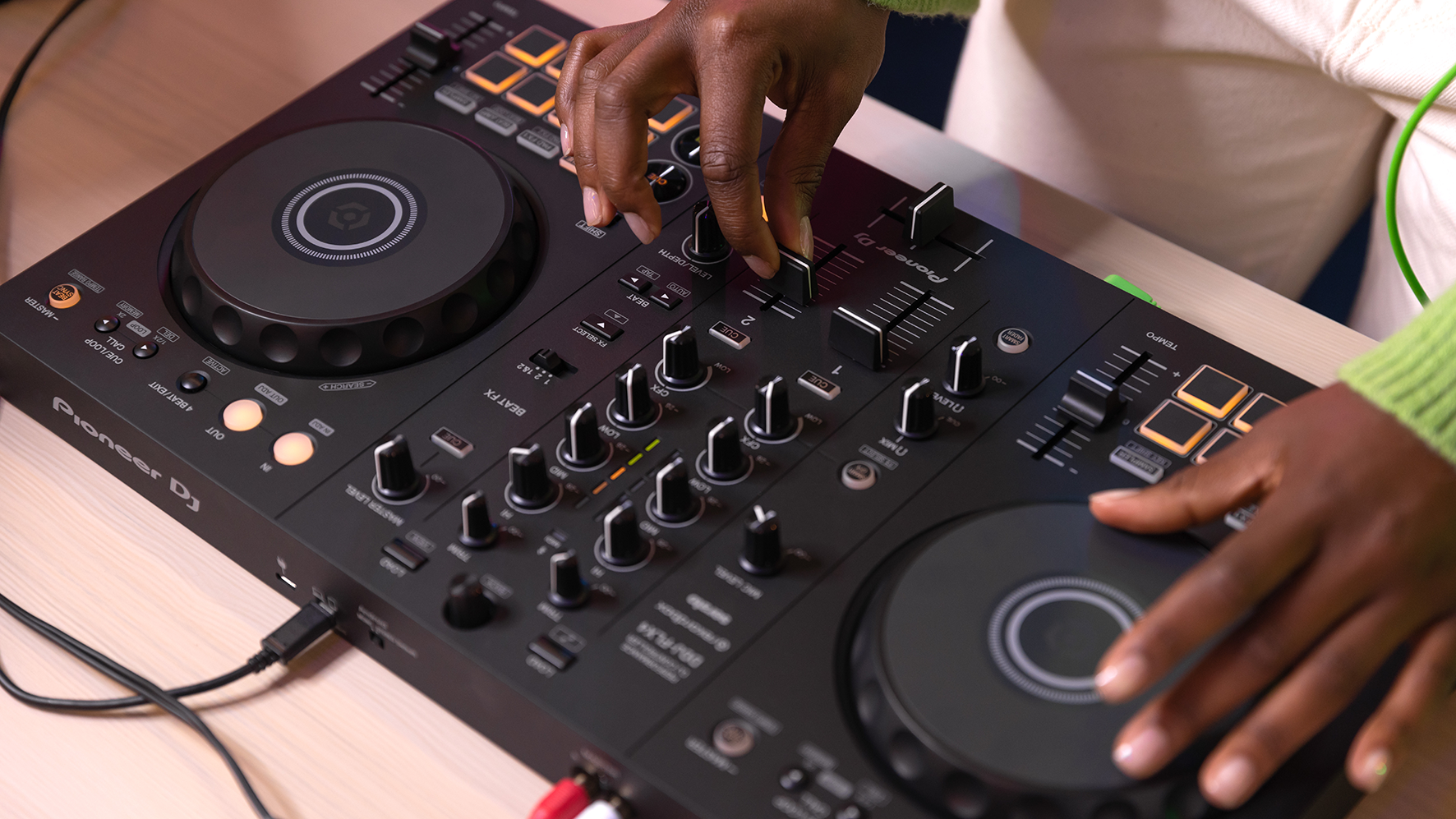
Controllers with club-standard layouts mirror the arrangement of professional CDJs and DJM mixers found in venues worldwide, making your eventual transition to professional equipment feel natural. Alternative layouts like battle-style configurations serve specific purposes but may limit your adaptability to standard club equipment. The Undisputed Champion: Pioneer DJ DDJ-FLX4 After extensive testing and community feedback, the Pioneer DJ DDJ-FLX4 emerges as the clear winner for most beginner DJs, earning consistent recommendations from experts and enthusiasts alike.
Priced at $299, this controller delivers exceptional value through its combination of professional features, beginner-friendly innovations, and software flexibility that remains unmatched in its price category. The FLX4's genius lies in its dual software compatibility, something that sets it apart from most competitors. Out of the box, you receive full access to rekordbox DJ software plus Serato DJ Lite, with the option to upgrade to Serato DJ Pro when your skills and needs evolve.
This flexibility eliminates the pressure of choosing the "right" software before you understand your preferences, allowing you to explore both ecosystems and make an informed long-term decision. Pioneer DJ's Smart Fader and Smart CFX features deserve special recognition for their approach to beginner assistance. Rather than dumbing down the mixing process, these innovations provide intelligent help that teaches proper technique while delivering professional-sounding results.
The Smart Fader automatically handles tempo matching, bass adjustment, and volume balancing during transitions, even when mixing dramatically different genres like 80 BPM hip-hop into 150 BPM techno. The Smart CFX function adds appropriate effects flourishes to enhance your transitions, demonstrating how effects should be used while you develop your own creative voice. The club-standard layout prepares you perfectly for professional equipment encounters.
The mixer section mirrors Pioneer's DJM series, the jog wheel placement matches CDJ positioning, and the performance pad arrangement follows industry conventions. This authentic feel means that skills developed on the FLX4 transfer directly to professional setups, eliminating the jarring adjustment period that affects DJs who learn on unconventional layouts. Modern connectivity options enhance the FLX4's versatility significantly. USB-C connections simplify setup while providing power and data through a single cable.
The upcoming iOS and Android app support transforms the controller into a pseudo-standalone system when paired with a smartphone or tablet, perfect for spontaneous sessions or traveling light. Integration with streaming services including TIDAL, Beatport, Beatsource, and SoundCloud Go+ expands your music access without requiring massive local libraries. Minor drawbacks include a somewhat plasticky feel compared to higher-end controllers and the absence of dedicated effects controls found on some competitors.
However, these limitations pale compared to the FLX4's comprehensive feature set and growth potential, making it the ideal foundation for most DJ journeys. The Budget-Conscious Choice: AlphaTheta DDJ-FLX2 For DJs seeking the Pioneer ecosystem's benefits at a lower price point, the AlphaTheta DDJ-FLX2 represents an exceptional value at $179. This streamlined controller maintains the essential elements that make Pioneer controllers special while eliminating features that beginners rarely need immediately.
The FLX2's multi-platform compatibility rivals its more expensive sibling, supporting rekordbox, Serato DJ Lite, and djay applications across desktop and mobile platforms. This software flexibility allows beginners to experiment with different environments without hardware constraints, discovering their preferences before investing in software upgrades or additional equipment. Smart Fader and Smart CFX features carry over from the FLX4, providing the same intelligent mixing assistance that helps beginners create impressive mixes from day one.
These features prove particularly valuable for absolute newcomers who might otherwise struggle with basic transitions, building confidence while teaching proper technique fundamentals. The simplified control layout focuses on essential mixing elements without overwhelming complexity. While this approach limits advanced techniques like complex effects manipulation, it creates an ideal learning environment for mastering fundamental skills. The clean, uncluttered interface helps beginners understand signal flow and control relationships without distraction.
Built-in sound card functionality allows direct connection to speakers and headphones, eliminating the need for additional audio interfaces or complex routing. This plug-and-play approach gets you mixing immediately without technical barriers that might discourage practice sessions. The FLX2's primary limitations include reduced audio quality compared to higher-end models and the absence of dedicated effects controls. These compromises reflect the budget positioning but don't significantly impact the learning experience for most beginners.
The plastic construction feels toy-like compared to more expensive controllers, though it remains functional and responsive enough for serious practice. The Feature-Rich Alternative: Numark Mixtrack Platinum FX The Numark Mixtrack Platinum FX challenges Pioneer's dominance by offering premium features typically found on much more expensive controllers. At approximately $300, this controller delivers exceptional value for DJs who prioritize advanced functionality and professional-level capabilities from day one.
Four-deck mixing capability sets the Platinum FX apart from most beginner controllers, enabling complex mixing scenarios that remain impossible on two-deck systems. This additional flexibility proves valuable for open-format DJs, mashup creators, and anyone interested in exploring advanced transition techniques. The ability to load different tracks on each deck opens creative possibilities that justify the controller's slightly higher complexity. High-resolution displays embedded in each jog wheel provide essential track information including position, BPM, and time remaining.
This visual feedback proves invaluable during learning, helping you understand track structure and timing relationships that might otherwise require guesswork. The displays also enhance performance confidence by providing constant awareness of track status. Extended pitch faders offer precise tempo control that exceeds most competitor offerings. These longer faders enable fine adjustments that prove crucial for beatmatching practice and creative tempo manipulation. The additional control range supports mixing across wider BPM ranges while maintaining precise adjustment capability.
The comprehensive effects section includes dedicated controls for multiple effect types, enabling real-time manipulation that adds professional polish to your mixes. Hot Cues, Auto Loop, Sampling, and Fader Cuts provide creative tools typically reserved for higher-end controllers, allowing immediate experimentation with advanced techniques. Serato DJ Lite integration provides professional-grade software with excellent stem separation capabilities, though the controller's limitation to Serato only may constrain software experimentation.
Users committed to the Serato ecosystem will appreciate the deep integration, while those preferring software flexibility might find this restriction limiting. The controller's main weakness lies in its Serato-only compatibility, preventing exploration of other software platforms. Additionally, the battle-style effects layout may feel unfamiliar to DJs expecting traditional mixer arrangements, though this design choice reflects professional scratch mixer conventions.
The Traktor Specialist: Native Instruments Traktor Kontrol S2 MK3 For DJs drawn to Traktor's unique workflow and advanced features, the Native Instruments Traktor Kontrol S2 MK3 provides unmatched integration at approximately $400. This controller represents the perfect marriage of hardware and software design, offering capabilities that remain impossible with third-party mappings. Traktor Pro 3 integration achieves a level of seamless interaction that sets the standard for software-controller relationships.
Every button, knob, and fader corresponds directly to software functions, creating an intuitive connection between physical actions and digital results. This tight integration eliminates the disconnect often felt when using generic mappings with non-native controllers. The superior build quality immediately distinguishes the S2 MK3 from budget competitors. Solid construction, responsive controls, and premium materials create a professional feel that inspires confidence and encourages extended practice sessions.
The investment in quality components pays dividends through years of reliable performance and consistent tactile feedback. Advanced feature implementation takes advantage of Traktor's unique capabilities including remix decks, loop recorder, and sophisticated effects routing. These professional-grade tools provide creative possibilities that extend far beyond basic mixing, enabling complex performance techniques and live remixing capabilities. The controller's primary limitation is its optimization for Traktor exclusively, though third-party mappings exist for other software platforms.
DJs committed to exploring multiple software options might find this specialization restrictive, while Traktor enthusiasts will appreciate the uncompromised integration. Higher pricing compared to multi-software alternatives may stretch beginner budgets, though the investment proves worthwhile for serious students planning long-term Traktor use. The superior build quality and advanced features justify the premium for users who value longevity and professional capabilities.
The Scratch Specialist: Pioneer DJ DDJ-REV1 The Pioneer DJ DDJ-REV1 caters specifically to beginners interested in scratching and turntablism, offering battle-style layout and scratch-focused features at $299. This specialized approach makes it ideal for specific use cases while potentially limiting appeal for general mixing applications. The battle-style layout rotates deck controls 90 degrees compared to club-standard arrangements, placing pitch faders at the top and creating the orientation familiar to turntablists.
This configuration feels natural for scratching while potentially confusing DJs accustomed to traditional layouts. The choice reflects professional scratch mixer conventions and prepares users for equipment like Pioneer's DJM-S series. Scratch assistance features help beginners develop turntablism skills through intelligent automation and guidance. Automatic crossfader cuts demonstrate proper timing while you focus on hand coordination. Auto-return to cue points eliminates the need for perfect platter control while learning fundamental scratch patterns.
These training wheels provide confidence-building support while developing real skills. Serato DJ Lite integration provides excellent scratch-focused tools and high-quality audio processing. The software's scratch mode optimizes performance for turntablism while maintaining full mixing capabilities for versatile use. Serato's reputation in hip-hop and scratch communities adds credibility to the controller's street-oriented positioning. The REV1's battle-style layout may feel awkward for DJs focused on traditional mixing techniques, making it less versatile than club-standard alternatives.
The scratch-specific feature set might prove unnecessary for DJs with no turntablism interest, potentially wasting controller space and budget on unused capabilities. Ultra-Portable Options for Maximum Flexibility For DJs prioritizing portability and convenience, several ultra-compact controllers deliver surprising capability in remarkably small packages. These options prove perfect for travel, spontaneous sessions, and situations where traditional controllers prove impractical.
The Hercules Starlight leads the ultra-portable category at just £79, providing essential mixing controls in a package small enough for laptop bags. Despite its minimalist approach, the controller includes crossfader, volume controls, and basic EQ functionality sufficient for learning fundamental mixing skills. Serato DJ Lite integration provides professional software capabilities that belie the controller's budget pricing. The compact design sacrifices advanced features for ultimate portability, making it ideal as a backup controller or travel companion rather than a primary learning tool.
The basic feature set focuses attention on core mixing skills without distraction, though ambitious beginners may quickly outgrow its limitations. The Numark DJ2GO2 Touch pushes portability even further while maintaining surprising functionality. Capacitive touch jog wheels provide precise track control in an impossibly small package, while dedicated level and pitch controls enable proper mixing technique development. The pocket-sized form factor makes it perfect for impromptu sessions and travel scenarios.
These ultra-portable options serve specific needs exceptionally well while accepting significant compromises in features and expandability. They work best as secondary controllers or ultra-budget starting points rather than primary learning platforms for serious students. Essential Features Every Beginner Should Consider Understanding key features helps you evaluate controllers beyond basic specifications and marketing claims. These elements directly impact your learning experience and long-term satisfaction with your choice.
Audio interface quality determines your sound quality and connection options. Built-in audio interfaces eliminate the need for separate hardware while providing professional-level audio processing. Look for controllers offering both RCA and quarter-inch outputs for maximum compatibility with different sound systems. Balanced outputs provide superior audio quality and noise rejection for professional applications. Software compatibility shapes your creative possibilities and learning path. Controllers supporting multiple software platforms provide flexibility for experimentation and growth.
Consider whether bundled software provides full functionality or limited versions requiring paid upgrades. Factor streaming service integration if you prefer cloud-based music libraries over local file collections. Build quality affects both immediate satisfaction and long-term durability. Quality jog wheels with appropriate weight and resistance feel more realistic and encourage proper technique development. Responsive faders and knobs inspire confidence while cheap controls frustrate learning efforts.
Consider whether construction quality supports your intended use intensity and transportation requirements. Connectivity options influence setup simplicity and expansion possibilities. USB-C connections provide future-proof compatibility and single-cable convenience. Multiple USB ports enable redundant connections or additional device integration. Mobile device compatibility expands usage scenarios beyond traditional computer-based setups. Performance pads and effects controls determine your creative expression possibilities.
Quality pads with velocity sensitivity enable dynamic performance techniques. Dedicated effects controls encourage experimentation and skill development. Consider whether control layouts match your preferred software workflow and performance style. Making Your Final Decision Choosing your first DJ controller requires balancing multiple factors including budget, intended use, software preferences, and growth potential. The recommendations in this guide reflect extensive testing and real-world feedback, but your personal priorities ultimately determine the best choice.
For most beginners, the Pioneer DJ DDJ-FLX4 provides the optimal combination of features, flexibility, and value. Its dual software compatibility, beginner-friendly innovations, and professional layout make it an excellent foundation for long-term development. The club-standard design ensures skills transfer directly to professional equipment, while the comprehensive feature set provides room for growth. Budget-conscious buyers should seriously consider the AlphaTheta DDJ-FLX2, which delivers essential Pioneer ecosystem benefits at a significantly lower price point.
While it lacks some advanced features, the core functionality and software flexibility provide excellent value for casual users and budget-constrained beginners. DJs interested in advanced features and four-deck capability should evaluate the Numark Mixtrack Platinum FX, which offers premium functionality at competitive pricing. The controller's Serato-only limitation requires commitment to that software ecosystem, but the feature richness justifies consideration for dedicated users.
Traktor enthusiasts will find no better option than the Native Instruments Traktor Kontrol S2 MK3, despite its higher price point. The unmatched software integration and superior build quality create an investment that pays dividends through years of professional-level performance. Aspiring turntablists should consider the Pioneer DJ DDJ-REV1, which provides scratch-focused features and battle-style layout that translate directly to professional scratch setups. The specialized design limits general mixing versatility but excels in its intended application.
Beyond the Controller: Building Your Complete Setup Your controller choice represents just the beginning of building a complete DJ setup. Consider additional components that enhance your learning experience and performance capabilities. Headphones prove essential for beatmatching practice and performance preparation. Look for closed-back designs with good isolation and accurate frequency response. Popular beginner options include the Audio-Technica ATH-M40x and Sony MDR-7506, which offer professional quality at reasonable prices.
Speakers or studio monitors provide essential feedback for mix evaluation and room filling capability. Active studio monitors like the JBL LSR305 or KRK Rokit series offer excellent accuracy for critical listening. For more casual use, quality bookshelf speakers or even good computer speakers can suffice initially. Software considerations extend beyond what's included with your controller. While bundled software provides excellent starting points, eventual upgrades to full versions unlock advanced features and capabilities. Budget for software upgrades as your skills develop and needs evolve.
Music sources require ongoing attention and budget allocation. Whether you prefer local file libraries, streaming service subscriptions, or record pool memberships, quality music access proves essential for meaningful practice and performance. Factor these ongoing costs into your total investment planning. Accessories like laptop stands, carrying cases, and cable management solutions enhance your setup's functionality and portability. These seemingly minor additions significantly impact your enjoyment and efficiency during practice and performance sessions.
Starting Your Journey: First Steps and Practice Tips Once you've chosen and acquired your controller, the real journey begins. Effective practice routines and learning strategies maximize your progress while building proper techniques from the start. Begin with software familiarization before attempting complex mixing. Learn to load tracks, understand waveform displays, and practice basic navigation. Most DJ software includes tutorial modes specifically designed for beginners – take advantage of these structured learning tools.
Practice beatmatching with the sync function disabled, even though modern software automates this process. Understanding how to match tempos manually builds essential listening skills and provides backup capability when technology fails. Start with tracks in similar BPMs before attempting larger tempo differences. Focus on smooth transitions before attempting creative techniques. Master basic blending, EQ swapping, and volume balancing before exploring effects and advanced features. These fundamental skills form the foundation for all advanced techniques.
Record your practice sessions for objective evaluation. Listening back reveals mistakes and improvements invisible during live mixing. Regular recording also documents your progress and builds confidence as skills develop. Seek feedback from experienced DJs and online communities. Platforms like Reddit's r/DJs and various Facebook groups provide supportive environments for beginners seeking advice and feedback. Local DJ communities often welcome newcomers and provide valuable mentorship opportunities.
Conclusion: Your Gateway to Musical Expression Choosing your first DJ controller marks the beginning of an exciting creative journey that can provide years of enjoyment and potentially evolve into a professional career. The controllers recommended in this guide represent proven starting points that have launched thousands of successful DJ careers while providing the flexibility and features needed for long-term growth. Remember that the most expensive or feature-rich controller isn't necessarily the best choice for beginners.
Focus on options that inspire practice, provide room for growth, and align with your budget and intended use. The skills you develop matter far more than the specific equipment you use to develop them. Your controller choice will influence your learning experience, but dedication, practice, and passion determine your ultimate success. Choose wisely, practice consistently, and prepare to discover the joy of moving crowds through the power of music mixing. The dance floor awaits your unique creative voice – let your journey begin.