Native Instruments Traktor MX2: The Deep Dive Review
By maikk. Published . Filed under The Breakdown.
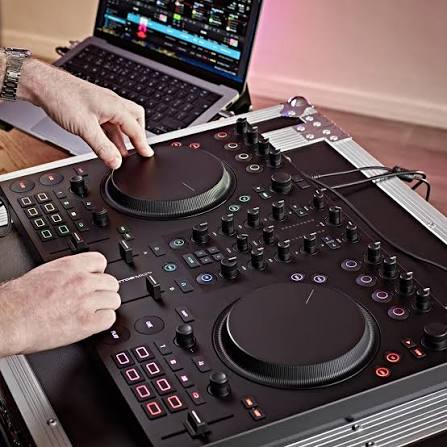
Is This the Controller That Brings Traktor Back to the Game?
🎛️ Native Instruments Traktor MX2: The Deep Dive Review Is This the Controller That Brings Traktor Back to the Game? --- Introduction: The Return of the King? Native Instruments just dropped the Traktor MX2 in October 2025, and it's the first full Traktor controller we've seen in six years. Let that sink in. Six. Years. While Pioneer DJ has been flooding the market with DDJ controllers, and everyone from Hercules to Reloop has been eating NI's lunch, Traktor has been sitting on the sidelines, quietly perfecting Traktor Pro 4 and waiting for the right moment to strike back.
That moment is now. The MX2 isn't just a controller—it's a statement. Native Instruments is saying: "We're still here, we still innovate, and we're coming for your DJ booth." But does it deliver? Is the MX2 the comeback Traktor desperately needs, or is it too little, too late in a world dominated by Pioneer and streaming-focused workflows? I spent a week torturing this controller—bedroom sessions, dark booth simulations, cable-swapping tests, effect abuse, and every loop trick I could think of. This is everything you need to know about the Traktor MX2.
Let's get into it. --- 📦 Part 1: Unboxing & First Impressions What's in the Box Open the MX2 and you get: ✅ Traktor MX2 controller ✅ USB-C cable ✅ Full Traktor Pro 4 license (worth $149) ✅ 2-month Beatport Streaming trial (new customers only) ✅ Quick start guide ❌ No carrying case (seriously, NI?) ❌ No power adapter (USB-C bus powered) --- Size & Weight The MX2 is noticeably larger than typical entry-level controllers like the Pioneer DDJ-FLX4: Dimensions: Width: 480mm / 19 inches (estimate based on comparisons) Depth: 280mm / 11 inches Height: 45mm / 1.8 inches Weight: 2.5kg / 5.5 lbs (mains-powered contributes to heft) The Reality: This is NOT a "throw in your backpack" controller.
It's portable, but it's substantial. Think "weekend warrior" not "ultra-mobile." Why the extra size? Bigger jogwheels, more breathing room between controls, and a proper mixer layout.
NI prioritized playability over pocketability. --- Build Quality & Design Materials: Industrial matte black plastic throughout Touch-sensitive jogwheels (non-motorized) RGB performance pads with small circle illumination (not full pad backlight) Illuminated bottom shell (RGB underglow for visual feedback) First Impressions: The MX2 has that understated Native Instruments aesthetic—purposeful, workmanlike, not flashy. It's not a light show like some controllers. Only the pad centers and the bottom shell light up. In photos and videos, it looks kinda dull. In person? Actually quite nice.
It feels serious, not gimmicky. Build Quality Verdict: ✅ Solid for the price ($449/£349/€399) ✅ Jogwheels are responsive and well-weighted ✅ Pads are bright and tactile ⚠️ Faders are scratchy (noticeably cheaper feel when you move them) ⚠️ All plastic construction (no metal anywhere) ⚠️ Height mismatch with other NI controllers (S4, X1, Z1) if building modular setup The Verdict: Build quality is exactly what you'd expect at this price. It's not a tank, but it's not a toy either.
The scratchy faders are the only real letdown. --- 🔧 Part 2: Technical Specifications Audio Interface Quality: 24-bit / 96kHz (high-res, pro-grade) Powered by: iZotope Ozone Maximizer integration in Traktor Pro 4 Outputs: Master Out: RCA + 3.5mm mini jack (BOTH on rear panel) Headphone Out: 1/4" (6.35mm) + 3.5mm mini jack Inputs: Microphone Input: 1/4" (6.35mm) on rear panel Hardware volume control for mic (physical knob) Mic signal routed through software (Traktor Pro 4) for full control Power: USB-C bus powered (no external power adapter needed) Mains-powered audio (higher voltage = cleaner, louder signal) Audio Quality Verdict: 🔥 Excellent.
The 24-bit/96kHz interface is club-ready. Clean, loud, punchy. The Ozone Maximizer keeps everything consistent and distortion-free.
No complaints here. --- Connectivity Front Panel: 2x Jogwheels (touch-sensitive) 16x RGB performance pads Mixer section (EQ, filters, faders, crossfader) FX controls (Mixer FX + Deck FX) Browse controls Rear Panel: 1x USB-C port (data + power) 2x RCA master outputs 1x 3.5mm mini jack master output 1x 1/4" mic input (with volume knob) 1x 1/4" headphone output 1x 3.5mm headphone output What's Missing: ❌ No XLR outputs (this is the biggest omission) ❌ No booth monitor output ❌ No additional line inputs Why This Matters: The lack of XLR means this controller is NOT club-standard for pro systems.
You're connecting via RCA, which is fine for house parties, bars, and small venues, but any serious club expects balanced XLR outs. The Target: This is clearly designed for home DJs, mobile gigs, and smaller venues—not Berghain. --- Performance Pads Total: 16 RGB pads (8 per deck) Modes: 4 assignable modes per deck The 4 Pad Modes: 1. Hotcues 8 hotcue points per deck Customizable colors Standard functionality 2.
Flux Loops (Traktor's "Slip Mode") Press pad to activate loop Track continues playing underneath the loop When you exit, track jumps back to where it would have been Perfect for seamless loop tricks 3. Pattern Player (Step Sequencer) Transforms pads into a drum machine 16 drum kits included in Traktor Pro 4 Program live percussion patterns Layer custom grooves into your set Syncs perfectly to BPM 4.
Stems Isolate vocals, drums, bass, instruments Mute/solo individual stems Real-time AI-powered stem separation Works with ANY track (not just stem-ready files) Pad Quality: ✅ Bright RGB illumination (only center circle lights up) ✅ Responsive and tactile ✅ Fully customizable colors ✅ Visual feedback matches software Verdict: The pads are excellent.
Stem control alone makes them worth it. --- 🎵 Part 3: Key Features Breakdown Stems: The Game-Changer What It Is: Traktor Pro 4's AI-powered stem separation breaks any track into 4 components: 🎤 Vocals 🥁 Drums 🎸 Instruments 🔊 Bass How It Works on MX2: 1. Press the Stems mode button 2. Pads instantly control each stem (4 pads per stem = mute/solo/volume/filter) 3. Real-time manipulation with no latency 4.
Works with any track in your library (not just pre-stemmed files) What You Can Do: Drop the bass and vocals for a breakdown Isolate drums for a transition Create acapella versions on the fly Layer stems from two tracks simultaneously Remix live without preparation The Reality: This is fucking incredible. Stem separation used to require pre-processing files. Now it's instant and hardware-integrated. The MX2 makes it feel natural.
Limitations: Stem quality depends on the track (some separate better than others) Requires CPU power (older laptops may struggle) Not perfect—you'll occasionally hear artifacts Verdict: Stems is the killer feature that sets MX2 apart from every other controller at this price. --- Pattern Player: The Live Production Tool What It Is: A step sequencer that turns the pads into a drum machine. How It Works: 1. Press Pattern Player mode 2. Select from 16 included drum kits 3. Program patterns live (hi-hats, kicks, snares, claps) 4. Auto-syncs to BPM 5.
Layer percussion over your tracks in real-time Use Cases: Build energy before a drop Add groove to minimal tracks Create custom fills and transitions Live production during DJ sets The Experience: Pattern Player is fun as hell. It blurs the line between DJing and live performance. You can literally create new rhythms on the fly. The Catch: It's not for everyone. If you're a traditional "two turntables and a mixer" DJ, you might never touch this.
But if you're into creative performance, it's amazing. --- Mixer FX: One-Knob Magic What It Is: 9 one-knob effects applied to entire channels (not individual decks). The 9 Mixer FX: 1. Filter (classic high/low pass) 2. Reverb (space and depth) 3. Delay (echoes and buildups) 4. Gater (rhythmic stutters) 5. Crush (bitcrushing distortion) 6. Flanger (sweeping modulation) 7. Brake (turntable stop effect) 8. Barber Pole (infinite rising/falling pitch) 9.
Formant (vocal-style filtering) How It Works: Single knob per channel Turn left for negative effect, right for positive Instant application (no menu diving) Perfect for quick drops and buildups The Reality: Mixer FX are essential for modern DJing. The one-knob design makes them fast and intuitive. You can destroy a track or build tension in seconds. --- Deck FX: Deep Sound Design What It Is: Access to 40+ studio-grade effects from Native Instruments.
How It Works: 2 assignable FX units (one per deck) Up to 4 effects per unit Layer, twist, and combine effects Control individual parameters per effect Effect Categories: Time-based (delays, reverbs, echoes) Modulation (flangers, phasers, chorus) Distortion (saturation, bitcrush, overdrive) Spatial (stereo imaging, autopan) Creative (Iceverb, Traktor Reverb, Ramp Delay) The Power: Deck FX gives you producer-level control over your sound. You can completely transform tracks in real-time. The Complexity: This is where things get deep. You can spend hours tweaking FX chains.
It's powerful, but it's also easy to overdo it. --- Loop & Beat Jump Controls Loop Encoder: Press to activate loop Turn to halve/double loop size Press again to deactivate Beat Jump: Jump forward/backward by loop size Set to 16-beat loop = jumps 16 beats Perfect for electronic music (jump to drops, skip intros) Flux Mode (Slip): Track plays underneath whatever you're doing Loops, scratches, cue jumps all return to "real" position Reverse button auto-engages Flux (brilliant touch) Why This Matters: These controls make creative looping effortless.
You can build tension, extend drops, and remix on the fly without losing your place. --- 🎧 Part 4: Software & Workflow Traktor Pro 4 (Included) Value: $149 (included with MX2) What's New in Traktor Pro 4: ✅ Stem separation (the headline feature) ✅ Pattern Player (drum machine) ✅ iZotope Ozone Maximizer integration ✅ Beatport Streaming integration ✅ Improved FX routing ✅ Enhanced mixer panel What's Still Dated: ⚠️ Interface resolution looks like it's from 2015 ⚠️ No video support (Serato and Rekordbox both have this) ⚠️ Library management is clunky compared to Rekordbox ⚠️ No standalone mode (you need a laptop—no USB stick support) Setup & Configuration: Plug-and-play (Traktor recognizes MX2 instantly) Import previous Traktor data without touching existing installation Deep customization available (button behaviors, fader curves, etc.) The Reality: Traktor Pro 4 sounds incredible and offers creative tools that Rekordbox and Serato don't have.
But the interface feels old, and the lack of video support is a dealbreaker for some DJs. --- Beatport Streaming Integration Included: 2-month trial for new customers What It Is: Access to millions of tracks without downloading Curated playlists and charts Browse and preview tracks in Traktor The Catch: Requires stable internet connection No offline mode (if WiFi dies, so does your music) Subscription required after trial ($9.99-14.99/month) Who It's For: Beginners who don't have a music library yet DJs who want instant access to new releases Anyone comfortable with streaming (Spotify generation) Who Should Avoid: Pro DJs playing in venues with unreliable internet Anyone who values library ownership DJs who play obscure or niche tracks (streaming catalogs have gaps) --- ⚖️ Part 5: Comparison with Competitors vs.
Pioneer DDJ-FLX4 (£229/$299) | Feature | Traktor MX2 | DDJ-FLX4 | |-------------|-----------------|--------------| | Price | £349/$449 | £229/$299 | | Software | Traktor Pro 4 (full) | Rekordbox (limited) / Serato (limited) | | Audio Quality | 24-bit/96kHz | 24-bit/44.1kHz | | Stems | ✅ Full integration | ❌ Not supported | | Pattern Player | ✅ Yes | ❌ No | | Size | Larger | Smaller, more portable | | Power | USB-C bus powered | USB bus powered | | XLR Outputs | ❌ No | ❌ No | | Beatport Streaming | ✅ 2-month trial | ❌ No | Verdict: MX2 is more expensive but offers full software, better audio, and creative features (Stems, Pattern Player).
FLX4 is cheaper and more portable but limited software. Choose MX2 if: You want creative tools and full Traktor Pro 4. Choose FLX4 if: You want a budget option and prefer Rekordbox/Serato. --- vs.
Traktor Kontrol S4 MK3 (£850/$999 - Discontinued) The S4 MK3 is the flagship Traktor controller (released 2018), but it's been discontinued. | Feature | Traktor MX2 | S4 MK3 | |-------------|-----------------|------------| | Channels | 2-channel | 4-channel | | Motorized Jogs | ❌ No | ✅ Yes (optional haptic drive) | | Screens | ❌ No | ✅ Dual high-res displays | | XLR Outputs | ❌ No | ✅ Yes | | Booth Monitor | ❌ No | ✅ Yes | | Price | £349 | £850 (used: £500-600) | Verdict: S4 MK3 is pro-level with 4 channels, screens, and XLR. MX2 is entry-to-mid level with 2 channels and no XLR.
Choose MX2 if: You want new hardware, portability, and don't need 4 decks. Choose S4 MK3 (used) if: You need pro features and don't mind buying second-hand. --- vs.
Hercules Inpulse 500 (£249) | Feature | Traktor MX2 | Hercules Inpulse 500 | |-------------|-----------------|--------------------------| | Software | Traktor Pro 4 (full) | Serato DJ Lite (limited) / DJUCED (full) | | Audio Quality | 24-bit/96kHz | 24-bit/44.1kHz | | Stems | ✅ Yes | ❌ No | | Light Guides | ❌ No | ✅ Yes (beginner-friendly) | | Price | £349 | £249 | Verdict: Inpulse 500 is beginner-focused with light guides for learning. MX2 is performance-focused with advanced features. --- ✅ Part 6: What the MX2 Does Right 1.
Stems Integration is Flawless Real-time stem separation with hardware control is game-changing. No other controller at this price offers this. 2. Audio Interface Quality is Excellent 24-bit/96kHz with Ozone Maximizer = club-ready sound. Clean, loud, professional. 3. Full Traktor Pro 4 Included Worth $149 alone. You're getting a complete setup out of the box. 4. Pattern Player Opens Creative Possibilities Live drum sequencing is rare in DJ controllers. It's fun, powerful, and inspires experimentation. 5. Mixer FX Are Fast & Intuitive One-knob effects for quick drops and buildups.
Essential for modern DJing. 6. Jogwheels Are Responsive Touch-sensitive, well-weighted, good size. No complaints. 7. Visual Feedback (Illuminated Shell) Subtle underglow that warns you when tracks are ending or loops are active. Clever design. 8. Deep Customization Available Traktor's software customization is extensive. Tweak everything. 9. Beatport Streaming Integration 2-month trial lets you start DJing immediately without a library. 10. Price-to-Value Ratio is Strong £349/$449 for full software + 24-bit audio + creative features = solid deal. --- ❌ Part 7: What the MX2 Gets Wrong 1.
No XLR Outputs This is the biggest omission. No XLR = not club-standard. You're limited to RCA outs. Impact: Fine for home, bars, mobile gigs. Not ideal for serious clubs or festival rigs. 2. Scratchy Faders The faders feel cheap when you move them. Noticeable scratchiness that detracts from the experience. Impact: Not a dealbreaker, but annoying for a controller at this price. 3. Traktor Pro 4 Interface Feels Dated The software interface looks like it's from 2015. Low-res, clunky, not modern. Impact: Functionality is great, but the visual experience feels old compared to Rekordbox. 4.
No Video Support Serato and Rekordbox both support video mixing. Traktor doesn't. Impact: If you mix visuals at events, Traktor isn't an option. 5. No Standalone Mode You need a laptop. No USB stick support like Pioneer's XDJ line. Impact: You're laptop-dependent. No backup if your computer crashes mid-set. 6. Streaming Requires Internet Beatport Streaming is great, but requires stable WiFi. Risky in many venues. Impact: Always have offline backup tracks or you're screwed. 7.
Height Mismatch with Other NI Controllers If you're building a modular Traktor setup (S4 + X1 + Z1), the MX2 doesn't match the height. Impact: Aesthetic and ergonomic annoyance for modular users. 8. No Carrying Case Included For a "portable" controller, the lack of a case is ridiculous. Impact: Budget an extra £30-50 for a bag. 9. Size is Larger Than Competitors Not "ultra-portable" like the FLX4. It's substantial. Impact: Less convenient for backpack DJs. 10. Limited Appeal Outside Traktor Ecosystem MX2 is Traktor-only. No native support for Rekordbox or Serato.
Impact: If you prefer other software, this controller isn't for you. --- 🎯 Part 8: Who Should Buy the MX2? ✅ The MX2 is Perfect For: 1. Traktor Loyalists You love Traktor and want a modern controller You've been waiting for NI to release new hardware 2. Electronic Music DJs You play house, techno, drum & bass, or bass music You value creative tools over traditional mixing 3. Bedroom DJs Ready to Level Up You've outgrown ultra-budget controllers You want full software and pro audio quality 4.
DJs Who Value Stems & Pattern Player You want to remix live without preparation You like blurring the line between DJing and production 5. Mobile DJs (Small-to-Mid Sized Gigs) You play bars, house parties, small clubs RCA outputs are fine for your use case 6. DJs Building a Home Studio You need a controller + audio interface combo You want high-res audio for production/recording --- ❌ The MX2 is NOT For: 1. Club DJs Who Need XLR You play large venues with pro sound systems Lack of XLR is a dealbreaker 2.
Mobile DJs Who Need Ultra-Portability You want something that fits in a small backpack Size matters more than features 3. Video DJs You mix visuals at events Traktor has zero video support 4. Rekordbox/Serato Loyalists You're committed to other software MX2 is Traktor-only (no cross-platform support) 5. DJs Who Demand Standalone Hardware You don't want to rely on a laptop USB stick playback is essential 6. Budget-Conscious Beginners £349/$449 is too expensive for your first controller Pioneer FLX4 (£229) or Hercules Inpulse (£150) are better entry points 7.
DJs Who Prioritize Build Quality Over Features Scratchy faders bother you You want metal construction and premium feel --- 🏁 Part 9: Final Verdict The Bottom Line The Traktor MX2 is the controller Native Instruments should have released three years ago. It's a confident, feature-packed return to form that proves Traktor is still relevant in 2025.
What Makes It Special: 🔥 Stems integration is revolutionary 🥁 Pattern Player opens creative doors 🎵 24-bit/96kHz audio is club-quality 💰 Full Traktor Pro 4 included = excellent value 🎛️ Mixer FX + Deck FX = deep creative control What Holds It Back: ❌ No XLR outputs = not club-standard ⚠️ Scratchy faders = build quality compromise 📱 Dated software interface = feels old 🎥 No video support = dealbreaker for some 💻 No standalone mode = laptop-dependent --- Rating Breakdown | Category | Rating | Notes | |--------------|------------|-----------| | Build Quality | 7/10 | Solid plastic, scratchy faders | | Audio Quality | 9/10 | Excellent 24-bit/96kHz interface | | Features | 10/10 | Stems, Pattern Player, 40+ FX | | Software | 8/10 | Powerful but dated interface | | Value | 9/10 | Full software + creative tools | | Portability | 7/10 | Substantial but manageable | | Connectivity | 6/10 | No XLR is a major miss | | Beginner-Friendly | 8/10 | Intuitive but deep features | Overall: 8/10 — Highly Recommended (with caveats) --- The Recommendation Buy the MX2 if: ✅ You're serious about Traktor ✅ You play electronic music and value creativity ✅ You want full software + pro audio for £349/$449 ✅ RCA outputs work for your venues Skip the MX2 if: ❌ You need XLR for club systems ❌ You're committed to Rekordbox/Serato ❌ You want ultra-portability ❌ Video mixing is essential --- Alternatives to Consider If you need XLR: Used Traktor S4 MK3 (£500-600) If you want cheaper: Pioneer DDJ-FLX4 (£229) If you want standalone: Pioneer XDJ-RR (£899) If you want Rekordbox: Pioneer DDJ-800 (£599) If you're a beginner: Hercules Inpulse 500 (£249) --- 💭 Final Thoughts: Is Traktor Back?
The MX2 proves that Traktor is far from dead. Native Instruments has created a controller that prioritizes creativity over convention, and that's exactly what electronic music DJs need. Stems alone makes this controller worth considering. The ability to isolate vocals, drums, bass, and instruments in real-time—with hardware control—is game-changing. Add Pattern Player, 40+ effects, and a 24-bit audio interface, and you've got a performance powerhouse at an entry-level price. But let's be real: The lack of XLR means this isn't for everyone.
If you're a club DJ who needs balanced outputs for professional systems, the MX2 doesn't cut it. You'll need to step up to a used S4 MK3 or look at other brands entirely. For everyone else? The MX2 is a compelling package. It's not perfect, but it's exactly what Traktor needed to stay relevant in a market dominated by Pioneer. Welcome back, Traktor. We missed you. --- The Bunker Collective Native Instruments provided no compensation for this review. We bought the MX2 with our own money and tortured it for a week. All opinions are our own. --- 📱 Your Thoughts?
Traktor users: is the MX2 the comeback you've been waiting for? Pioneer loyalists: does this change your mind? Drop your take in the comments.
Tags: NativeInstruments, DJController, ControllerReview